I founded Everclimb LLC in 2019 and took its two products from the first prototype to a production launch with a seven-person team. The platform was generating revenue and had onboarded 15 gyms and around 300 climbers before I rebuilt V3 independently using AI.
7people on the team
15gyms onboarded
~300climbers onboarded
Revenuegenerating before the rebuild
My role
Founder and product lead, Everclimb LLC
Team
Seven people across design, front-end, and back-end development
Products
AMPclimb, a B2B web platform for gym staff, and Climbary, a mobile app for climbers
Research
Six surveys with 1,000 responses, 60 gym visits, three years exhibiting at CWA
Outcome
Launched and generating revenue, with 15 gyms and around 300 climbers onboarded
What carries over
Discovery with two user groups, requirements and prioritization, cross-functional delivery, onboarding and adoption
01 / 072019 / CrimpIt prototype
2019: a problem from my own training.
As a collegiate competitive climber, I regularly returned to the gym to find a route I had been working on removed without warning. Other climbers and competitors described the same problem.
AMPclimb / GYM STAFF
Make it practical for setters to maintain route information.
Gym staff knew when routes would come down. I needed to give them a useful way to record and share that information.
I first considered a 3D model of the gym. A photo-tagging approach was simpler: setters could photograph their walls, add route tags, and create the route database while doing work they already understood.
MY DECISION
Build route records from wall photos.
The CrimpIt prototype connected layouts, sections, photos, and uniquely identified routes. The map provided context; each photo tag carried the route information.
THE TRADEOFF
Every gym has a different layout and setting process. Setup needed to work with the gym’s own photos and maps.
WHAT THE PROTOTYPE HAD TO ANSWER
The first prototype was a test with four questions. Can a tag created on the staff side be found on the climber’s screen? Can it carry the grade, color and reset date? Can the same tag ask climbers a short survey? Can those answers roll up into stats for staff?
ROUTE DATA MODEL
01Wall layoutThe gym's physical shape
02Wall sectionA place on that layout
03Wall photoA recognizable view
04Route tagOne identity in both products
AMPclimb Maintain the route⇄Climbary Record the climb
Original route-tagging sitemap. The shared route record came before the separate product experiences.
Climbary / CLIMBERS
Help climbers keep track of their projects.
A missed reset announcement could end weeks of work on a route. Social posts, bulletin boards, and website updates were easy to miss.
I spoke with peers and fellow competitors about this frustration. The climber experience needed to connect to information maintained by staff, while making it useful to record progress between visits.
MY DECISION
Use the same route record in both experiences.
A climber could recognize a route in a wall photo and record progress against its tag. Staff could then connect that activity to the route they maintained.
THE TRADEOFF
The app needed to help people with their own climbing goals to give them a reason to use it regularly.
ROUTE DATA MODEL
01Wall layoutThe gym's physical shape
02Wall sectionA place on that layout
03Wall photoA recognizable view
04Route tagOne identity in both products
AMPclimb Maintain the route⇄Climbary Record the climb
Original route-tagging flow: one route identity connects the staff’s wall gallery to climber feedback.
SHARED DEPENDENCY
A useful reset warning required staff and climbers to identify the same route.
See the original CrimpIt prototype ↗
The 2019 prototype: staff tag a route directly on the wall photo, then fill in its name, grade, color, type and wall.
02 / 07CrimpIt → first AMPclimb & Climbary experiences
I researched what both user groups needed.
Across six surveys with 1,000 responses, I explored reset awareness, climbing preferences, progress tracking, and the information gym staff wanted.
AMPclimb / GYM STAFF
Understand what route setters wanted to know.
Staff could watch people climb, but had limited ways to collect structured feedback about how routes were being used.
I used the survey findings to plan the setting workflow and identify relevant route and community information. I worked through the connected web and mobile flows in early wireframes, before I had formal design training.
MY DECISION
Give staff a dedicated workspace.
AMPclimb focused on maintaining routes and understanding the wall. It used the same underlying records as the climber app.
THE TRADEOFF
The early dashboard collected too much information in one view. Later iterations needed to make the data easier to act on.
COMPETITIVE ANALYSIS
The largest competitors all started from a 2D floor plan. The gym sends a layout, and the vendor spends one to four weeks building a digital model. Setters and climbers don’t think in floor plans. They walk the gym and look at walls, holds and colors. So I had staff tag climbs directly on wall photos, which lets any gym set itself up the same day without my help.
TWO PRIMARY USER GROUPSONE PHYSICAL SPACE
AMPclimb / staffMaintain the wall.
Understand inventory, resets, and community response.
Climbary / climbersBuild personal progress.
Find routes, record attempts, and return to projects.
Staff and climbers share the same walls, but need different reasons to use a digital product. The photograph illustrates that shared physical context.
Climbary / CLIMBERS
Understand what made logging worthwhile.
Climbers wanted to find routes, remember attempts, and see their progress across visits.
I planned a separate mobile experience around those needs. Recording an attempt or send could support the climber’s own history and also contribute information about the route.
MY DECISION
Make personal logging useful in its own right.
Climbary focused on route discovery and progress tracking, using the route structure maintained in AMPclimb.
THE TRADEOFF
More activity alone would not help a setter. It needed to stay connected to the relevant route and wall.
WHAT CLIMBERS TOLD ME
In one survey I asked climbers how often they hear about a reset before it happens. 45.7% said rarely or never.
Always7%
Often21.1%
Sometimes26.3%
Rarely13.2%
Never32.5%
Gyms posted resets on Instagram, bulletin boards and their websites. Each one depended on the climber going to look.
TWO PRIMARY USER GROUPSONE PHYSICAL SPACE
AMPclimb / staffMaintain the wall.
Understand inventory, resets, and community response.
Climbary / climbersBuild personal progress.
Find routes, record attempts, and return to projects.
Staff and climbers share the same walls, but need different reasons to use a digital product. The photograph illustrates that shared physical context.
SHARED DEPENDENCY
Climber logging could inform staff decisions if both interfaces referred to the same route records.
03 / 07First working product → field research & broader explorations
I tested how the product fit into gym operations.
The first demos received positive feedback, but initially did not lead to adoption. I visited gyms and hosted an AMPclimb booth at CWA for three years to sell the product, learn from customers, and understand the industry.
AMPclimb / GYM STAFF
Learn from the people running the gym.
I visited 60 out-of-state climbing gyms, built relationships with owners, and hosted an AMPclimb booth at CWA for three years.
At CWA I sold and demonstrated the product, spoke with prospective customers, joined routesetting roundtables, and researched competitors. Gym visits and testing with setters helped me understand differences in team size, reset routines, and daily operations.
MY DECISION
Use field research to decide what belonged in the product.
I revised workflows and priorities around what staff could maintain in daily use. Broader operations and point-of-sale ideas remained design explorations.
THE TRADEOFF
Expanding the list of possible features was easier than getting the core workflow adopted. The route and wall experience remained the priority.
SALES + PRODUCT RESEARCHCWA / THREE YEARS
At my AMPclimb booth at CWA. I hosted a booth for three years, combining sales and product demos with customer research, routesetting roundtables, and competitor research.
Climbary / CLIMBERS
Test the experience during a gym visit.
I tested with climbers as well as setters to understand how they found routes and recorded their climbing.
I tested the mobile experience between attempts and followed how staff kept its wall information accurate. Demonstrating both products at CWA showed me which questions prospective customers asked first.
MY DECISION
Include onboarding and daily use in the product work.
I tested the connected workflows and personally walked several gym teams through using the software on site.
THE TRADEOFF
A good climber interface still depended on a manageable setup process for the gym.
SALES + PRODUCT RESEARCHCWA / THREE YEARS
At my AMPclimb booth at CWA. I hosted a booth for three years, combining sales and product demos with customer research, routesetting roundtables, and competitor research.
SHARED DEPENDENCY
Gym setup, maintained route data, and regular climber use all affected whether the connected product would work.
04 / 07AMPclimb V1 → V2 · Climbary V1 → V2
I organized the experience around walls and routes.
The first interfaces showed a lot of data. I revised them so staff could focus on a particular wall and climbers could find the routes in front of them.
AMPclimb / GYM STAFF
Make wall data useful for a setting decision.
Gym totals were less useful when a setter was trying to understand one section of the wall.
I separated climbing disciplines, connected the map to wall-specific views, and moved less relevant information away from the main dashboard. Route distribution, age, and activity needed a clear physical scope.
MY DECISION
Separate map context from route records.
Selecting a wall narrowed the information shown. Routes still came from tags on staff-created photos, which made the data easier to create and maintain.
THE TRADEOFF
A custom digital gym model could add setup work. The photo-based approach used the gym’s own materials and supported simpler onboarding.
ITERATION
Gyms asked for a top-down map next to the wall photos. I first had staff draw each wall section as a polygon, but a polygon has no direction. Wall photos are taken left to right, so I switched to a line that follows the wall the same way. A tag’s position on the photo, combined with the wall’s length, places the route on the map.
SHARED SPATIAL MODELCURRENT SCREEN COMPOSITION
Shared wall structureStaff analysis and climber navigation.
Current screens illustrate the spatial model developed through earlier iterations. AMPclimb uses an actual gym floor plan and demonstration route data; Climbary shows its native gym view.
Climbary / CLIMBERS
Help climbers find the wall and route they wanted.
Climbers needed to connect the view on their phone with the wall in front of them.
I organized wall photos into sections, consolidated the header, and made map access easier to reach. I also explored wall lines and route positions to improve orientation.
MY DECISION
Reuse the wall structure for discovery.
Staff used the structure to scope their work; climbers used it to browse the available routes and find their projects.
THE TRADEOFF
The top-down map needed enough detail to orient people without becoming a complex model to maintain.
SHARED SPATIAL MODELCURRENT SCREEN COMPOSITION
Shared wall structureStaff analysis and climber navigation.
Current screens illustrate the spatial model developed through earlier iterations. AMPclimb uses an actual gym floor plan and demonstration route data; Climbary shows its native gym view.
SHARED DEPENDENCY
Layout → section → photo → route. The map supplied location context; photo tags created and maintained the route database.
05 / 07Original platform / production release & onboarding
I led a seven-person team through launch.
Before the AI rebuild, AMPclimb and Climbary were live and generating revenue. We onboarded 15 gyms and around 300 climbers.
AMPclimb / GYM STAFF
Lead the team from product decisions to delivery.
I led a seven-person cross-functional team with designers, front-end developers, and back-end developers for the web and mobile products.
My work covered research, product priorities, experience design, and coordinating development across both apps. I stayed involved in testing and personally onboarded several gyms on site.
MY DECISION
Deliver the full staff and climber workflow.
The launch included a production web platform for gym staff and a mobile app for climbers. I helped teams set up their gyms and use the software in their daily work.
THE TRADEOFF
A release needed both technical delivery and a workable adoption process. Gym setup and staff training were part of bringing the platform into use.
ORIGINAL PRODUCTION PLATFORMBEFORE THE AI REBUILD
Launched and generating revenue
7people on the cross-functional team
15gyms onboarded
~300climbers onboarded
DesignFront-end developmentBack-end development
AMPclimbStaff web platform
ClimbaryClimber mobile app
Original production release of the staff web platform and climber mobile app, before the independent V3 rebuild.
Climbary / CLIMBERS
Launch the mobile app alongside the staff platform.
We onboarded around 300 climbers as part of the original platform launch.
I coordinated the mobile experience with the designers and developers building the staff web app. Testing with climbers helped us check route discovery and progress tracking against the data maintained by gym teams.
MY DECISION
Make both experiences ready for real use.
Climbary launched as the climber-facing part of the connected, revenue-generating platform. It shared route information with AMPclimb while supporting personal climbing progress.
THE TRADEOFF
Staff setup and climber onboarding were different tasks. I had to account for both when planning delivery and adoption.
ORIGINAL PRODUCTION PLATFORMBEFORE THE AI REBUILD
Launched and generating revenue
7people on the cross-functional team
15gyms onboarded
~300climbers onboarded
DesignFront-end developmentBack-end development
AMPclimbStaff web platform
ClimbaryClimber mobile app
15 gyms and around 300 climbers were onboarded to the original platform. The seven-person team worked across design and web/mobile development.
SHARED DEPENDENCY
Launching required both the staff web platform and climber mobile app to work against the same route data.
06 / 07Workflow improvements / across iterations
I reduced extra steps in daily use.
I looked for repeated work and inconsistencies in reset communication, route status, and progress logging.
AMPclimb / GYM STAFF
Connect reset planning to climber communication.
Staff should be able to warn affected climbers as part of scheduling a reset.
I worked on linking reset dates to the projects recorded against a route. The shared route identity made it possible to identify which climbers needed a warning.
MY DECISION
Use the reset date to trigger the relevant warning.
The current implementation connects reset scheduling with notifications for climbers projecting the affected routes.
THE TRADEOFF
Removing a route from current inventory must still preserve the climber’s previous attempts and sends.
WHAT CHANGED
My first version had staff send reset notifications by hand. That added a task to their routine. Now the warning goes out automatically when a route gets a reset date.
ACTION → CONSEQUENCESHARED ROUTE
AMPCLIMB / STAFFAssign a reset date
Update the route that is coming down.
↓
THE SHARED ROUTE RECORDFind affected projects
Connect the reset to climbers working on this route.
↓
CLIMBARY / CLIMBERReceive a relevant warning
Return to a project before it disappears.
The reset notification flow connects a staff decision to a climber’s project. Dashboard capture uses illustrative data.
Climbary / CLIMBERS
Keep route status consistent with the climbing history.
The earlier experience asked people to manage their route status separately from their attempts and sends.
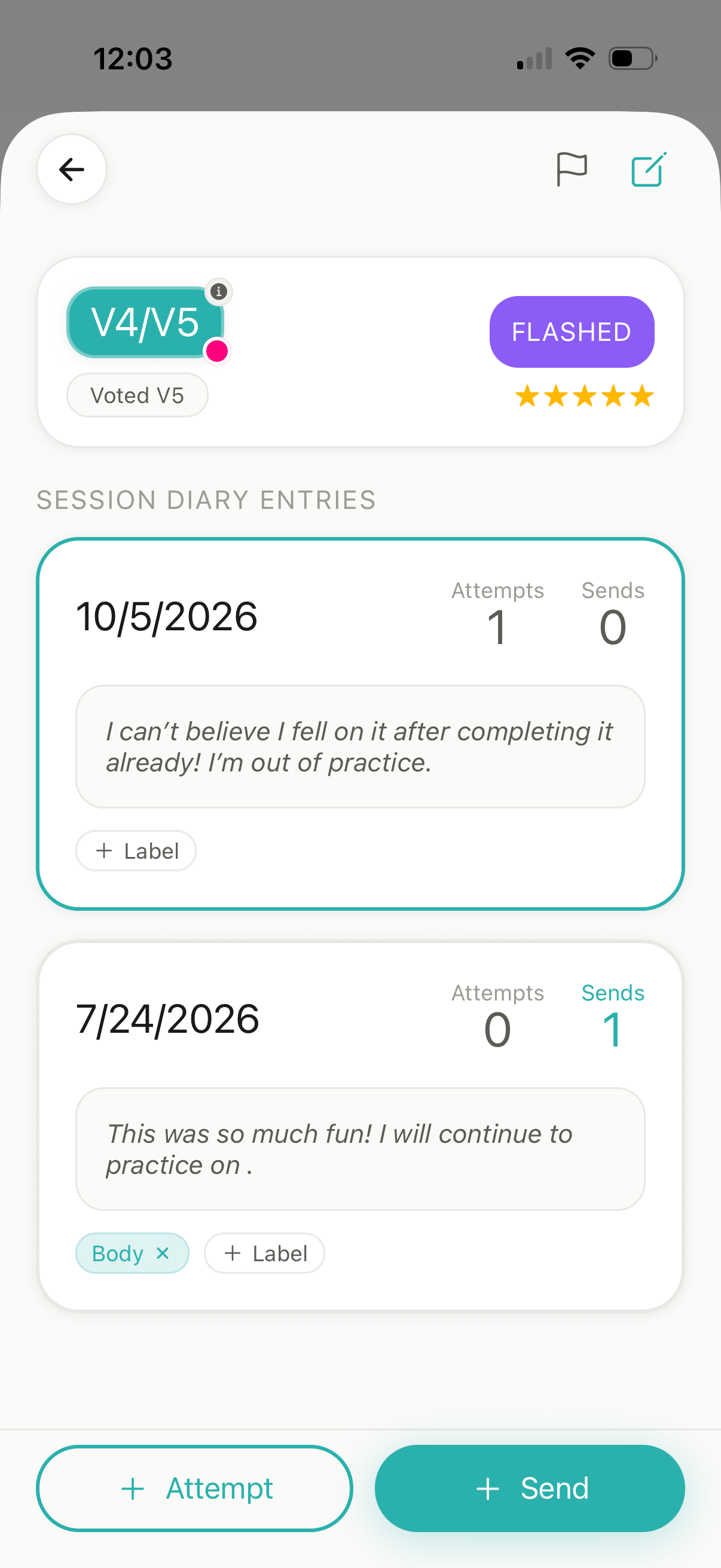
I consolidated the route page around attempts, sends, notes, ratings, and grade feedback. Its summary could then follow what the climber recorded.
MY DECISION
Derive status from recorded activity.
The current route page combines dated diary entries with direct Attempt and Send actions.
THE TRADEOFF
A climber’s history needs to remain useful after the gym has taken the route down.
WHAT CHANGED
Climbers used to choose a status for each route themselves. That caused decision fatigue and left contradictory information when someone forgot to update it. Now the status comes from what they log.
CLIMBARY V3CURRENT ROUTE VIEW
Climbary V3: route status, grade feedback, dated diary entries, and direct Attempt / Send actions in one view.
SHARED DEPENDENCY
Reset scheduling can identify affected projects. Attempts and sends can update route status while preserving the climber’s history.
07 / 07V3 / independent rebuild after launch
I rebuilt the launched products independently with AI.
Budget constraints led me to rebuild both products myself using AI. I was rebuilding a platform that had already launched, generated revenue, and onboarded gyms and climbers.
AMPclimb / GYM STAFF
Take on implementation as well as product ownership.
After leading the original team-built platform through launch, I used AI to rebuild AMPclimb independently for V3.
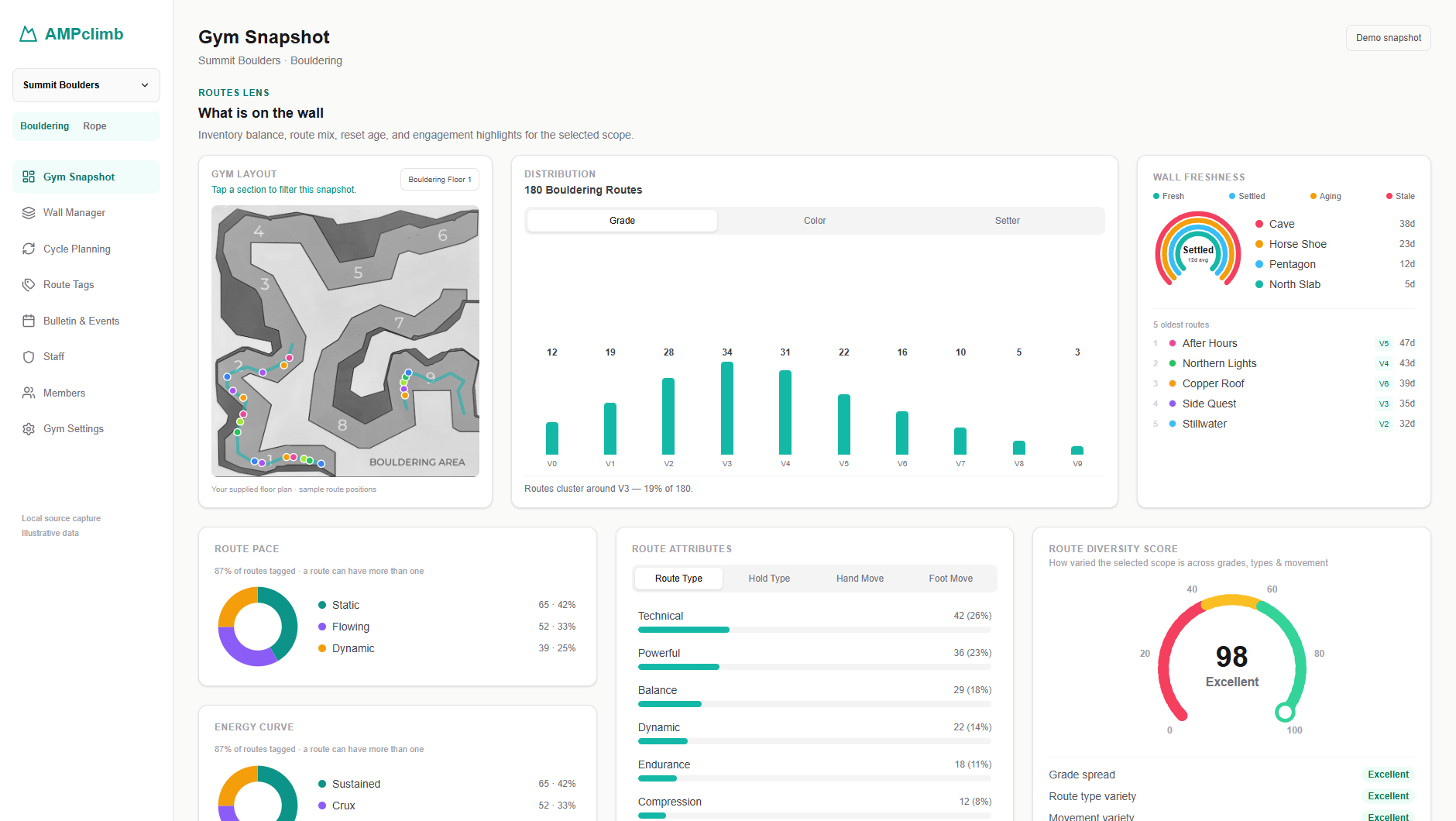
I brought the research, design decisions, and gym feedback into the new implementation. The current dashboard combines route distribution, freshness, and attributes to help staff assess their walls.
MY DECISION
Use the existing product knowledge to guide the rebuild.
I kept the route and wall model central, while revising the workspace around specific staff decisions.
THE TRADEOFF
AI helped me implement the product under budget constraints. I remained responsible for feature choices, checking the output, and testing the workflows.
CURRENT UI / DEMONSTRATION DATAGYM SNAPSHOT
AMPclimb V3, shown with an actual gym floor plan and demonstration route data. Named routes and varied ages illustrate how freshness can guide reset planning.
Climbary / CLIMBERS
Make logging useful before a gym connects.
I rebuilt Climbary independently using AI alongside AMPclimb, after the original mobile app had launched.
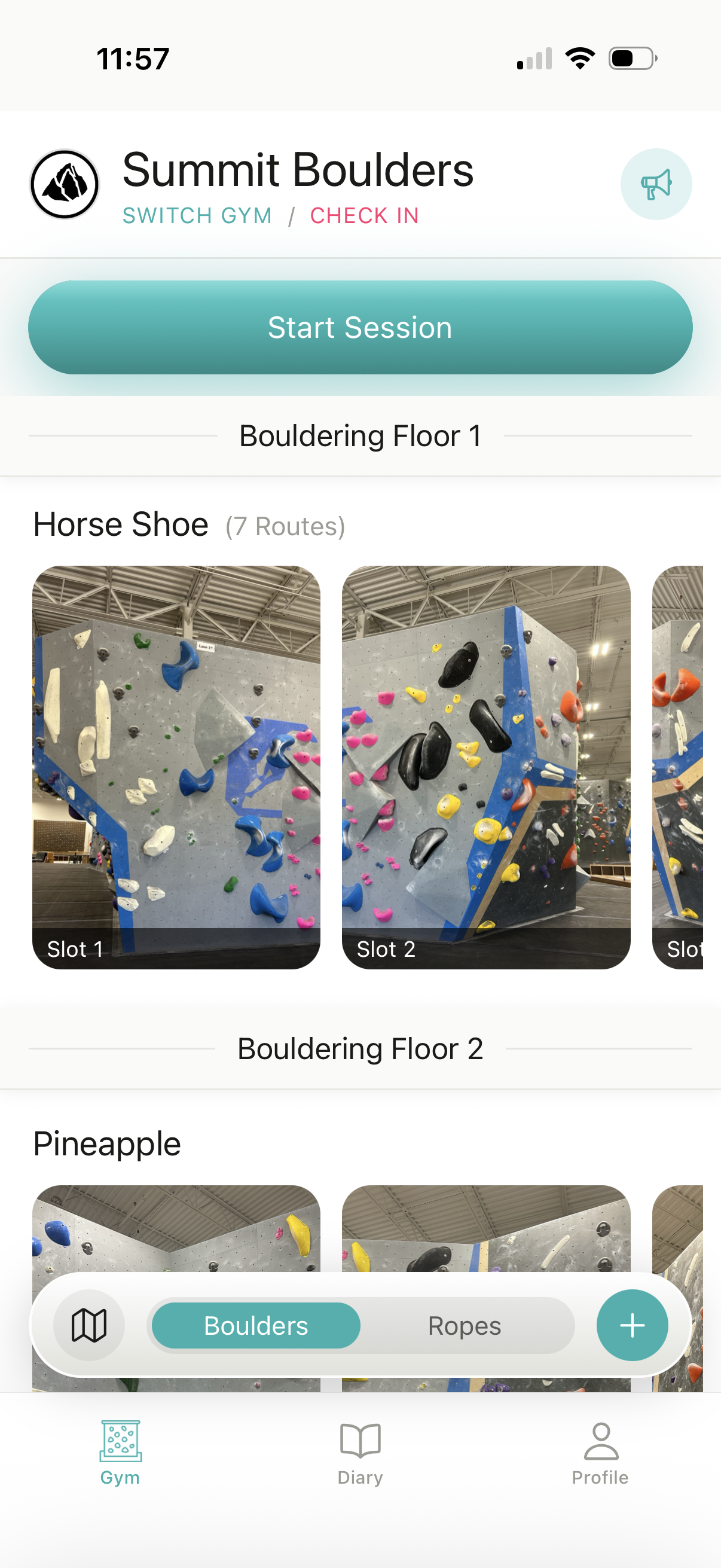
I added support for personal photo tags and quick-added routes so logging could work at a gym that had not adopted AMPclimb. I also made Start Session prominent and kept map access and quick logging within reach.
MY DECISION
Support personal routes alongside official gym routes.
Official routes support discovery and shared gym feedback. Personal routes let a climber start logging without waiting for their gym to connect.
THE TRADEOFF
Personal records and gym-maintained routes have different owners and lifecycles. Those distinctions needed to remain clear.
CLIMBARY V3CURRENT GYM VIEW
Climbary V3. Start Session and persistent map, discipline, and quick-add controls support use while actively climbing.
SHARED DEPENDENCY
The rebuild carried forward the route model, staff workflows, and climber needs developed through the original launch and subsequent use.
HOW I WORKED
Scope, stories, and measures.
Three examples from the product: what I kept out of scope, how I write a requirement, and what I would measure next.
PRIORITIZATION
What stayed in, and what stayed out.
The first demos got positive feedback but did not lead to adoption. I cut scope back to the workflow staff could maintain every day.
Kept
Photo-tagged route records
Wall-specific dashboard views
Reset warnings for climbers
Parked
A 3D model of the gym
Point-of-sale
Member management
REQUIREMENT / RESET WARNING
A user story with acceptance criteria.
As a route setter, I want climbers who are projecting a route to be warned when I schedule its reset, so that they can come back before it is taken down.
Given a route with recorded climber activity, when staff assign it a reset date, then the climbers projecting that route receive a warning.
Climbers with no activity on that route are not notified.
When the route is removed from the wall, each climber’s attempts and sends on it remain in their history.
MEASURES
What I would measure next.
The launch numbers show onboarding. These would show whether the product keeps working after it.
Gyms keeping routes currentShare of onboarded gyms that update route data every week.
Climbers who come backShare of climbers who log a second session.
Warnings that workShare of warned climbers who return to the route before its reset.
CURRENT PRODUCT SCREENS
AMPclimb & Climbary.
Open either gallery to explore the current screens and read a short explanation of each view.
AMPclimb uses demonstration data. Climbary shows its native light and dark interfaces.
PRODUCT EVOLUTION
From V1 to V3.
Three versions of the web platform and mobile app. Each image pairs the staff and climber views.
V1
General gym overview
Starting point
I started with a route database, basic gym statistics, and a separate view for climbers.
Why: staff and climbers needed separate products. I used a top-down map only to show where you are, not as the place to tag routes.
→
V2
Wall-specific workflows
V1 → V2
I brought the wall map into the dashboard and organized both products around floors, walls, and climbing discipline. Climbers could see upcoming resets.
Why: the first dashboard showed too much at once. I cut the cards down, split wall and community stats, and gave each wall section its own row of photos on mobile.
→
V3
The independent rebuild
V2 → V3
After the platform launched and generated revenue, I rebuilt both products independently with AI. The staff view added route freshness; the climber view focused on sessions and quick logging.
Why: staff needed to make setting decisions, not just read charts, so the map and charts became filters. On mobile, the map, discipline toggle and quick add moved into one floating control, which left room for Start Session.
V1 and V2 show historical screens. AMPclimb V3 uses demonstration data; Climbary V3 follows the site theme.
DESIGN PROCESS
Behind the screens.
Working files from my wireframes and iterations. Select an image to enlarge it.
Wireframes. My working board for the first version. The staff dashboard, reporting, and mobile screens were sketched and annotated here before anything was built.Information architecture. How a climber gets to a route: the gym layout, then a wall section, then the wall photo, then the route tag.Iteration. Gyms asked for a top-down map. Polygons had no direction, and wall photos are taken left to right, so I replaced the polygon tool with a line that follows the wall. A tag’s position on the photo then places the route on the map.
CONTACT
Get in touch.
Hiring for a product role, or working through a product challenge? I’d love to hear what you’re thinking.